
Parseur integration with Shipday
Turn the order emails from your ordering platform into Shipday orders with Shipday’s email integration. Shipday Support completes the setup once your sample emails arrive.
-
You need a Shipday account with access to the paid email integration feature, access to configure order email recipients or forwarding in your POS, online store or ordering platform, and at least five sample order emails for setup. Create your free Shipday account here (if you don’t have one)
-
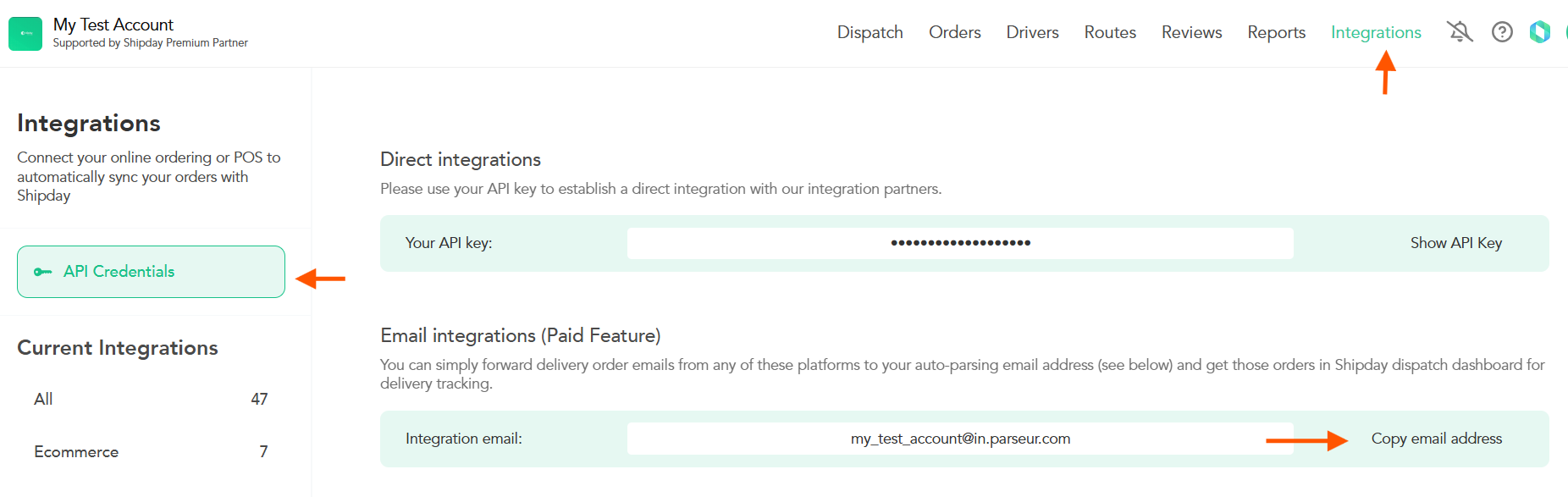
Log in at dispatch.shipday.com, go to
Integrations>API Credentialsand copy the address underEmail integrations (Paid Feature).
-
In your ordering platform, configure the order notification recipient or forwarding rule to send order emails to your Shipday integration address.
-
Send at least five sample order emails after the address is configured.
-
Email support@shipday.com with the subject “Email integration setup”. Include your Shipday account email, the platform sending the emails, and confirmation that your samples have been sent. Our team will configure the email integration and let you know when it is ready.
-
After Support confirms activation, send a new test order email and confirm that an order is created in Shipday. Check the customer details, address and order information.
If the integration email is missing or an order email does not create an order, contact support@shipday.com with your Shipday account email and the sample order reference.
Need help? Email support@shipday.com
Ready to get started?
Play around with it first, add your team, pay later.